

Cause
- Known issue with Broadcom NIC driver on Windows 2012 Server Hyper-V Host machine
Resolution
 CAUTION: This solution needs advanced Operating System knowledge. Consult your system administrator for help. Sage isn't liable for issues caused by improper changes to the Windows Registry. Always back up your data before applying advanced solutions.
- Update Network Card (NIC) driver on Hyper-v Host machine
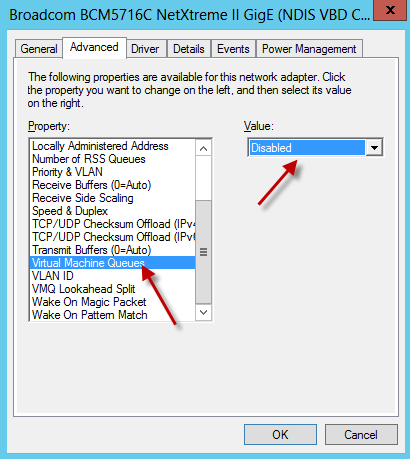
- Disable 'Virtual Machine Queue' (VMQ) on the physical NIC on the Host machine
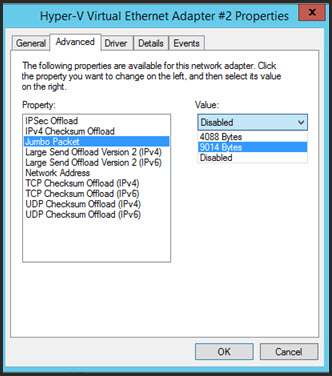
- Enable Jumbo Frames / Packets and set value to 9014 bytes on Hyper-V Host NIC
- To check the current RSC status, run the following PowerShell command from the Hyper-V host:
Windows 2019 and 2022 Servers:
Disable RSC on the Virtual Switch
Get-VMSwitch | Select-Object *RSC*
To Disable RSC on the Virtual Switch, run the following PowerShell command from the Hyper-V host:
Set-VMSwitch -Name vSwitchName -EnableSoftwareRsc $false
 NOTE: To Enable RSC for a virtual switch, use the following PowerShell command on the Hyper-V host:
Set-VMSwitch -Name vSwitchName -EnableSoftwareRsc $true
 Africa
 Asia
Asia Australia
 Canada
 France
 Ireland
 Kenya
Kenya Nigeria
 Portugal
 South Africa
 Spain
Spain United Arab Emirates
 United Kingdom
 Germany