Reconciliation and troubleshooting steps to reconcile your cash account
Summary
Resolution
Reconcile your cash account to your bank statement
- Enter the statement and reconciliation date. The dates must be the same and use the last day of the month.
- Enter the beginning and ending balances from your bank statement.
- Mark all transactions that cleared your bank.
 TIP: To change the status of a continuous range of checks, click Range. Enter the range of check numbers, then click Cleared or Outstanding.
 - In Version 2025, click the Find button to search for a transaction by description, check #, or amount.

- Correct any incorrectly posted transactions. Make sure to void and reenter the transaction using the same date as the original one.
- Add any bank charges or fees.
- Continue until the Out of balance amount is 0.00.

Reconcile your bank reconciliation to General Ledger (G/L) balance
- Click Reconciliation Summary... button.
- The difference for Cleared and Outstanding must both be 0.00. The Outstanding side represents the G/L balance.
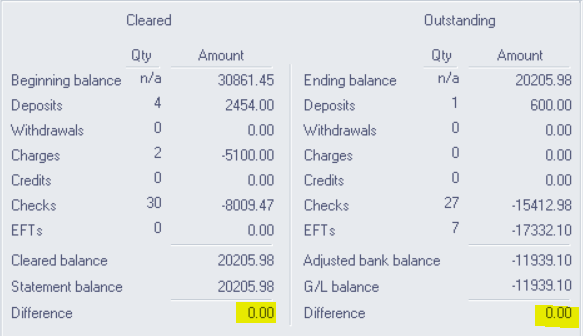
- When your cash account reconciles, print the CM, Reports, Print Reconciliation Report using the same dates. Keep this report for your audit trail.
- Use the 'Troubleshooting Checklist' below if you encounter a difference between Cleared and Outstanding.
Research reconciliation discrepancies
- Select CM, Transactions, Print Reconciliation Report.
- Enter the same dates and balances used in your Bank Reconciliation.
- Print or Preview the GL, Reports, Account Detail Report for the Cash Account. Use the same dates as your reconciliation report.
- Compare the Reconciliation Report to your Account Detail Report to look for any discrepancies.
- Compare the transactions on the bank statement to the Reconciliation report. Make note of any missing items.
- Preview a CM, Reports, Check Register and CM, Reports, Bank Transactions Report to look for the missing items. Determine if you’re using the correct date and cash account.
Enter missing transactions included in G/L but missing from reconciliation
- For Payroll, Accounts Payable or Cash Management checks
- Click CM, Transactions, Instant Checks
- Post the missing check. Clear the Post to G/L check box to eliminate duplication of G/L posting
- For missing Accounts Receivable deposits, select AR, Transactions, Bank Deposits, and redeposit the checks
- For missing Cash Management deposits or charges, select CM, Transactions, Enter Bank Transactions. Clear the Post to G/L check box
- For additional information, see Checks are missing from the bank reconciliation and check register
How to avoid reconciliation problems
- General Ledger journal entries don’t post to the CM Bank Reconciliation. For this reason, process all transactions that affect the General Ledger from within the Cash Management module
- When voiding transactions, use the same void date as the original transaction
- Reconcile at the end of each month before closing the month
Do you reconcile more than once in the same month?
- Review how to Reconcile more than once in the same month.
Troubleshooting Checklist
| Symptom | Reason | Solution |
| A voided check is outstanding on the reconciliation screen | You entered a check with a date in this reconciliation period but voided with a date after the reconciliation period. | Enter a different reconciliation date that includes the void, or make a note on the Reconciliation Report explaining the difference due to the void. |
| A check shows on the check register but not on the reconciliation screen. | You cleared a check on an earlier reconciliation, possibly due to an error made when entering dates on the Reconcile Checking Account window. | Enter the statement date you used when clearing the item, and mark the item as outstanding. Change the statement date back and clear the item on the correct statement. |
| You voided a transfer between accounts but it still appears on one of the accounts. | When voiding a transfer between accounts, it’s necessary to void the Charge and the Deposit on the appropriate accounts. One of these transactions didn’t take place. | Void the transaction. |
| You can't void a bank transaction or a check. | You can't void a cleared bank transaction. | Mark the transaction as outstanding on the Reconcile Checking Account window. Void the transaction. |
| A check has a different amount on the bank statement than what is appearing on the reconciliation screen. | Assuming that the bank statement is correct, there was an error in the entry of the check. | Void the check and reenter it. |
| Handchecks written to cash doesn’t appear on the reconciliation screen. | The system didn't process a check, so it won't reflect on the reconciliation screen. | Go to Enter Bank Transactions - Charge to enter the check. Specify not to post it to the General Ledger. |
| You reconciled the cash account last month without a problem. This month, all CM transactions reconcile with transactions in the GL and vice versa, but the Summary screen shows a difference between the GL and CM. | You backdated a posting to a prior month in either CM or the GL. To verify, reprint the reconciliation report for the prior months reconciliation, using the dates and balances entered. Compare the new report to the report for the prior reconciliation. | Enter the missing transaction in either CM (without posting to the GL) or in the GL. |
Need more help?
Related Solutions
Solution Properties
- Solution ID
- 222924250017605
- Last Modified Date
- Tue Sep 16 20:44:08 UTC 2025
- Views
- 0