Create an archive or copy of an existing company
Summary
Sage BusinessWorks makes it easy to create an exact copy of your company with its build-in utility. Use it to archive your data at year-end, switch your General Ledger fiscal year, or update your Inventory Control costing method.
Resolution
To copy a company
- Have all other users exit Sage BusinessWorks.
- From the Sage BusinessWorks Launcher, select Utilities, Maintain Companies.
- Click OK at the exclusive option message.
- Click the Look-up button to select the Company ID that you need to copy.
- Select the company and click Accept.
- Click the Copy button.
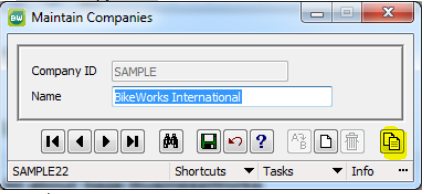
- On the Copy Company screen, enter a new Company ID (for example, PAYROLL2024).
- Check the Copy User security to grant users the same user security as the original company.
- Then select OK to copy your company and restore to the new company ID.
To create a new company based on data from a copied folder
- Start Sage BusinessWorks.
- From the launcher select Utilities, Maintain Companies.
- Add the company to restore, using the same ID as the one in the backup.
- If you use the same ID, see How to change or rename a company ID
- Failure to change the original company ID will result in loss of data in the live company
- Browse to Sage\BWData\[Company ID] and delete the folder's contents without deleting the folder itself.
- Copy the contents from the old \BWData\Company ID folder to the new location.
Need more help?
Solution Properties
- Solution ID
- 222924250017616
- Last Modified Date
- Mon Sep 14 19:56:27 UTC 2026
- Views
- 0