

Summary
You can add a box to the W-2 using Enhanced Tax Reporting in Sage BusinessWorks by inserting a column and adding the Box ID.
Resolution
- PR, Taxes, Print W-2s. Once you’ve progressed through the Enhanced Tax Reporting W-2 setup, a grid will appear. This grid lists your employees and their totals.

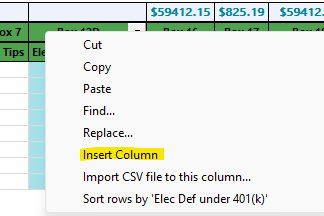
- Right-click the heading and select Insert Column.
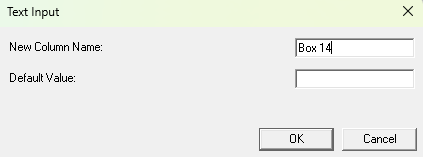
- Enter the Box ID in the New Column Name. For example, Box 14.
-
Leave Default Value: blank.
- Click OK.
- The column appears on the grid. The Heading will become yellow with a drop-down arrow.
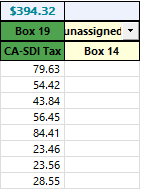
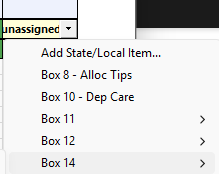
- Select the drop-down arrow.
- Choose the desired box number and ID.
- Manually enter amounts in the added column.
 Africa
 Asia
Asia Australia
 Canada
 France
 Ireland
 Kenya
Kenya Nigeria
 Portugal
 South Africa
 Spain
Spain United Arab Emirates
 United Kingdom
 Germany