| | Microsoft Granular Delegated Admin Privileges (GDAP) renewal email - FAQ |
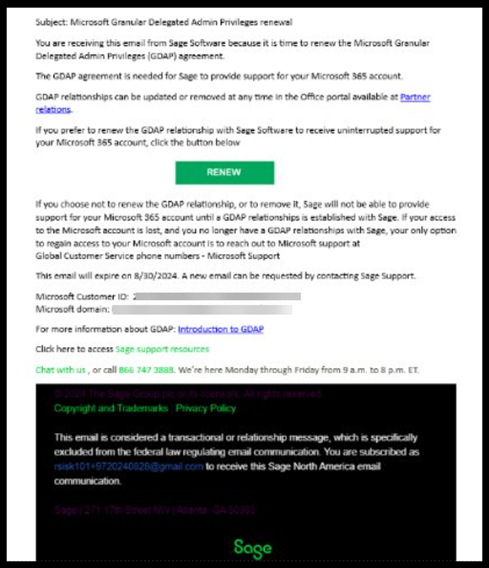
| Answers | ▼1. What is GDAP? GDAP stands for Granular Delegated Admin Privilege. It allows partners like Sage to access and manage specific aspects of a customer's Microsoft 365 account. GDAP uses more precise and limited permissions compared to traditional Delegated Admin Privileges (DAP). ▼2. Why do I need a GDAP agreement with Sage? A GDAP agreement is necessary for Sage to support your Microsoft 365 account. Without this agreement, Sage can't assist you with tasks such as resetting passwords, managing Multi-Factor Authentication (MFA) settings, or other support activities. ▼3. How do I renew my GDAP relationship with Sage? Starting in December 2024, Sage will send a GDAP renewal email to customers with expiring GDAP relationships. You’ll need your Microsoft Administrator Credentials to renew. The email will guide you through the renewal process. It’s important to follow the instructions in the email to ensure continuous support from Sage. Once we renew the relationship, it will auto renew until it’s canceled. See an example of email below:
 ▼6. What do I do if my GDAP relationship expires? If your GDAP relationship expires, you’ll need to request a new GDAP relationship. You can do this through the email you receive. You can contact Sage Support for assistance if you have issues with your email. ▼8. How can I reset my Microsoft Administrator Password? If your GDAP relationship with Sage has expired and you need to reset your Microsoft Administrator Password, you must contact Microsoft directly for support. Click this link and go to the “Work or School” tab for Microsoft support phone numbers.
Related articles Microsoft Granular Delegated Administrative Privileges (GDAP) renewal email |
|