

Summary
Cause
As per Microsoft, (link shared below), all customers as of the 1st of June will be required to disable TLS 1.0 and 1.1 on their operating systems, via the registry editor. This is due to security risk vulnerabilities in the older versions of TLS. Subsequently, all customers will have to turn on TLS 1.2 also via the registry.
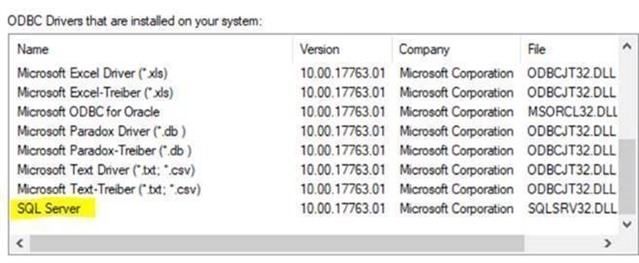
We have found that all software using the current SQL driver, as highlighted below, will get the above error when the application is trying to locate a SQL database.
Resolution
Microsoft has released a new SQL server drive that supports TLS 1.2. The new driver is called ODBC for SQL Server 17, as shown below. All applications needing to connect to a SQL Server database, will be required to connect using the new driver. This usually requires a config change in the connection configuration of an application.
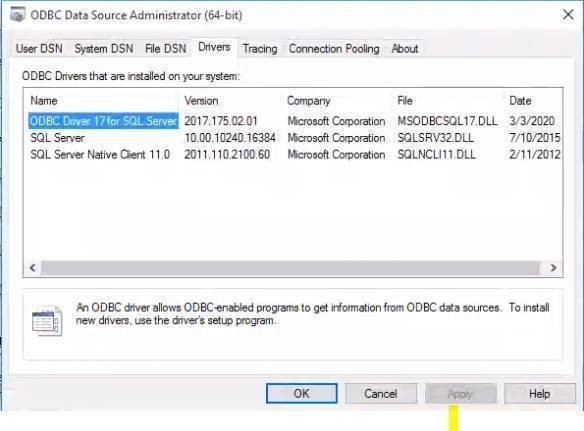
Please note that this can only be replicated, if the SQL server is installed on a different machine, as to the ERP software. (server + workstation setup).
If the ERP/BMS works, Sage Intelligence will rely on that connection and will also successfully work.
Note: For Sage 500 Product Line, a new Sage Intelligence Client installer is available to use when the local machine's TLS 1.0 and 1.1 is disabled.
Please contact Sage 500 Support Team for the installer.
 Africa
 Asia
Asia Australia
 Canada
 France
 Ireland
 Kenya
Kenya Nigeria
 Portugal
 South Africa
 Spain
Spain United Arab Emirates
 United Kingdom
 Germany