

Summary
Sage BusinessWorks 2026 is unable to email reports or forms if Windows doesn't have a default application assigned to the .eml file type. Assigning Outlook as the default application for .eml files resolves the issue.
Resolution
Set the default application for .eml files
- Click the Windows Start button and type Default apps.
- Select Default apps.
- In Enter a file type or link type, enter .eml.
- In Choose a default, select:
- Outlook (New), or
- Outlook (Classic)
- Close the settings window.
Verify resolution
- Return to Sage BusinessWorks.
- Attempt to email the report or form again.
- Select the correct email service, Outlook 32 or Outlook 64.
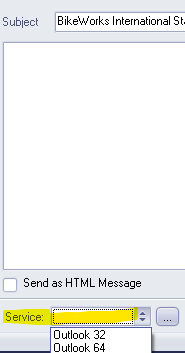
- Confirm the email opens successfully in Outlook.
Need more help?
 Africa
 Asia
 Australia
 Canada
 France
 Ireland
 Kenya
 Nigeria
 Portugal
 South Africa
 Spain
 United Arab Emirates
 United Kingdom
 Germany