

Summary
Answers
Year-end Updates
- Sage 100 Payroll 2.26.0 - The PR 2.27.0 update is compatible with all currently supported versions with any update level: 2026, 2025, 2024, and 2023 (for this final year-end). This update prepares the program for year-end forms processing in payroll and ensures correct data routing to these forms.
The 2.27.0 release notes document some changes, but there are many state and local last-minute changes and PIM code (data-mapping tag) updates not available in prior versions. If you can’t update to 2.27.0, thoroughly review your forms for accuracy and make necessary corrections in the Aatrix forms preparer. See the Sage 100: Download Portal for download links. The estimated release date is December 20th, 2026.
TIP:
For 2026 year-end specific resources, see Sage 100 Year-End Processing Resources for year 2026
- Payroll Tax Update - Run the Payroll Tax Update when prompted or later from the Utilities area of the Payroll module regularly, especially before year-end tax reporting. Always back up MAS90 system files before running the update. This update, along with Payroll product updates, will update important system files and ensure correct payroll tax options and rate changes are available in the system. See Sage 100 Payroll Tax Update Guide.
- Payroll Status Check - Run the Payroll Status check utility from the Utilities Menu in Payroll after installing any updates to payroll. Correct warnings and errors as needed. See Payroll Status Check utility for details.
- Tax Table Update (TTU) - not applicable as legacy payroll versions (v2017 and older) are retired and are no longer available.
Interim Release Download (IRD) - The 2026 IRD is required and currently applies only to 1099 processing in Accounts Payable (AP). IRD installation will appear as "Installed End of Year Changes" in the Installed Modules Listing in Library Master, Reports. See the Sage 100: Download Portal. Estimated release date is December 20th, 2026.
The 2026 IRD is compatible with the following versions of Sage 100:
Sage 100 2026.0 – 2026.1 (7.50.0 – 7.50.1)
Sage 100 2025.0 – 2025.3 (7.40.0 – 7.40.3)
Sage 100 2024.2 – 2024.4 (7.30.2 – 7.30.4)
TIP:
For 2026 year-end specific resources, see Sage 100 Year-End Processing Resources for year 2026
The 2026 IRD is compatible with the following versions of Sage 100:
Sage 100 2026.0 – 2026.1 (7.50.0 – 7.50.1)
Sage 100 2025.0 – 2025.3 (7.40.0 – 7.40.3)
Sage 100 2024.2 – 2024.4 (7.30.2 – 7.30.4)
See the Sage 100: Download Portal.
Install the PR 2.27.0 update before running W2s and any other year-end forms. Year-end processing can be run before or after updating payroll to 2.27.0 or running W2s.
The Payroll Tax Update can be run as soon as it prompts the user to run via the pop-up in the program, or at any time by going to Payroll, Utilities, Payroll Tax Update. Always perform a backup of the MAS_system folder in your MAS90 directory before running the Payroll Tax Update.
There is no harm in running the Payroll Tax Update before a new payroll year is started, as it will simply make any new options available in your install so that they're ready if needed. Apart from any company specific tax rates set in Company Tax Group Setup, payroll tax rates are kept in our cloud and applied according to the check date.
Year-end Processes
It’s recommended to finalize all postings for the 2026 payroll year and complete the year-end processing to close the payroll year before making any entries for 2027. This is important because the year-end processing triggers essential calculations and rollovers, such as time off carryover, deduction goals, and Direct Deposit year-to-date amounts. It is possible to run payroll for the new year before completing the year-end processing. However, it's not the recommended practice. Please see What happens in Sage 100 when you skip Period End Processing at Payroll year end
It isn’t necessary to run W2's before running period-end processing. Sage 100 has partnered with Aatrix for forms processing since MAS90 4.50. The data tables that store tax reporting information maintain detailed records year-over-year in all versions.
If you’re running Sage 100 2018 or newer (“Payroll 2.X”), there’s no need to create a copy company, as the new payroll program keeps many detailed records year-over-year (according to the setting in Payroll Options). The exception is if you’re running Sage 2017 or older (“legacy payroll”), in which case a year-end copy company is required for record keeping in these retired versions.
Tax reporting forms, including W2s, should be run in the "live company" and not in a copy company. This ensures that the forms archive is maintained together in the same database.
Reopening a closed payroll year should be avoided whenever possible. Certain amounts, such as benefit accruals, are reset during year-end processing (unless the anniversary date reset option is used).
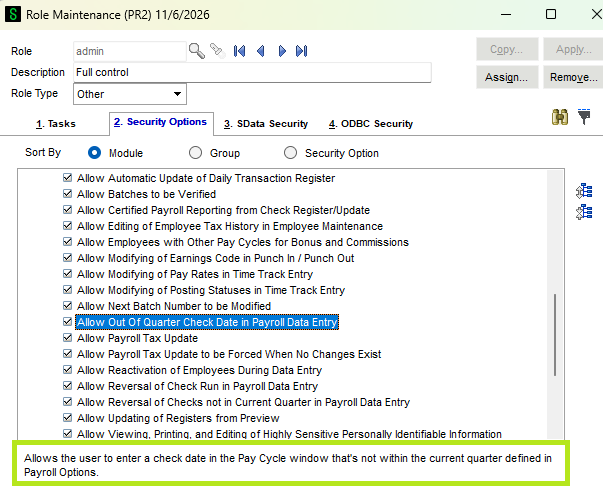
If a back-dated corrective posting is needed, enable the "allow out of quarter check date in payroll data entry" option in Library Master, Security, Role Maintenance:
If checks were processed incorrectly, they should be reversed and re-entered correctly. If this isn't possible, you can manually edit the wage and tax history. For detailed instructions, see Edit employee wage and tax history in Tax Summary
Year-end processing should be run before any payroll for the new year is processed, and can be run before or after updating payroll to 2.27.0 and/or running W2s.
Year-end Forms
Most forms can be printed on plain printer paper, but some require a pre-perforated 4-part blank page. The official red ink forms for certain government copies of W2/W3, 1099/1096, etc., are no longer required when printing forms from Aatrix Federal and State Tax Reporting. For more details, see Forms used to print W2s, 1095s and 1099s
Aatrix Tax Reporting forms update independently from the Sage 100 version, so even older versions may be able to run the 2026 W2 after updating the forms. However, only supported versions will receive the necessary year-end updates to ensure data is correctly routed from Sage 100 files to the Tax Reporting forms. Sage 100 support can’t assist with any issues running W2s or other Tax Reporting forms in unsupported versions. If needed, corrections can be made directly in the Aatrix form processor.
The NEC (Non-Employee Compensation) version of the 1099 is supported on all currently supported versions of Sage 100, from v2022 to 2025.
Yes, an active payroll subscription is required for processing any new Tax Reporting forms in payroll. Have questions about your subscription? Call 1-888-721-8989, open 9 a.m. - 8 p.m. ET, Monday-Friday unless otherwise noted.
Common issues
Access to the payroll module requires an active payroll subscription plan.
Regular customers: See Error: "Payroll Expiration Date is Invalid. Your payroll subscription will expire in xx days."
Channel Partners / Sage Accountants Network (SAN) members: See Your Payroll subscription has expired. You can continue processing payroll for....
CAUTION:
Channel Partners and Sage Accountants Network (SAN) members receive NFR (Not For Resale) activation keys and programs. The payroll expiration date in NFR versions is hard coded and can’t be changed. For those running the 2023 version of Sage 100, access to the payroll module will expire on 12/31/2026, starting a 45-day lockout timer. You MUST upgrade to a supported version. NFR versions of Sage 100 2024 will expire on 12/31/2027, Sage 100 2025 on 12/31/2028, and so on.
Users may experience issues with Aatrix Federal and State Tax Reporting Updates that fail to install.
Refer to this article for helpful tips on environmental settings and resolution options: Unable to Install Aatrix Federal and State Tax Reporting Updates
 Africa
 Asia
 Australia
 Canada
 France
 Ireland
 Kenya
 Nigeria
 Portugal
 South Africa
 Spain
 United Arab Emirates
 United Kingdom
 Germany